

Identity Verification on Serpworks: Step-by-Step Guide & Revocation
Learn how to verify your account identity on Serpworks to unlock payouts, display a verification badge on your profile, and manage your submitted details.
Direct Answer Summary
To complete identity verification on Serpworks , go to your Identity Verification page, enter your full name, contact number, government ID (CNIC/Passport/NIN/SSN), upload your document, and submit. If you made a mistake during submission, click Revoke Verification on the same page to reset the form and re-upload your correct documents. Verification is required to receive payouts on Serpworks.
Why Get a Verification Badge on Serpworks?
Completing identity verification provides key account privileges while helping maintain trust, authenticity, and platform security.
Required for Payouts
Identity verification is the only way Serpworks will process payouts to your account.
Build Account Credibility
Verified profiles display an official verification badge, reassuring clients that your identity has been confirmed.
Direct Review Support
If additional documents or proof are needed to confirm your identity, our review team will contact you directly.
Step-by-Step Guide: How to Verify Your Account
Follow these simple steps to complete your identity verification.
Access the Page
Log in to Serpworks and open your Identity Verification page.
Enter Personal Details
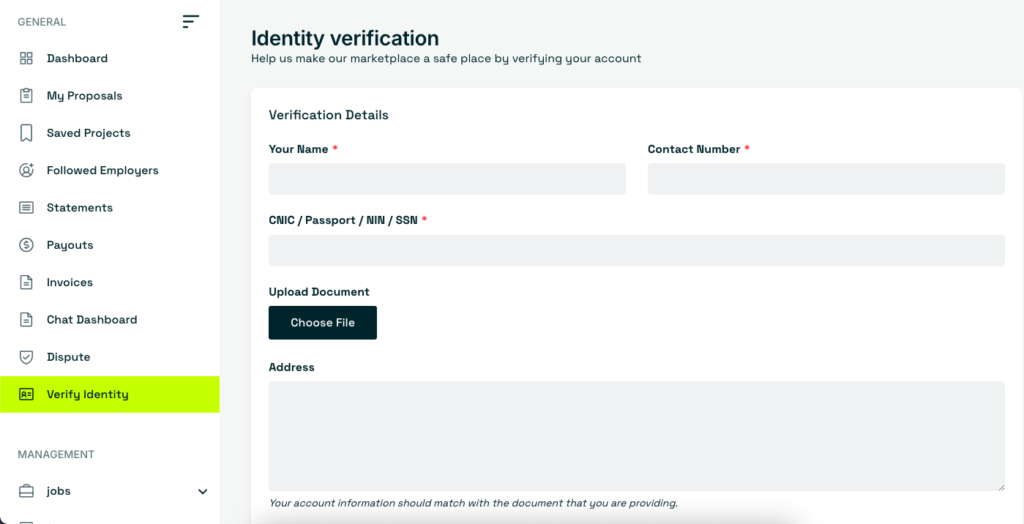
Enter your full legal name, contact number, government ID (CNIC, Passport, NIN, or SSN), and current residential address.
Upload Document
Click Choose File and upload a clear, legible photo or scan of your government-issued ID.
Submit Verification
Double-check your information, make sure it matches your ID, and click Submit Verification.
Submitted Details by Mistake? How to Revoke Verification
Uploaded an incorrect file or made an error? You can revoke your submission and update your verification details instantly.
Revoke Your Submission
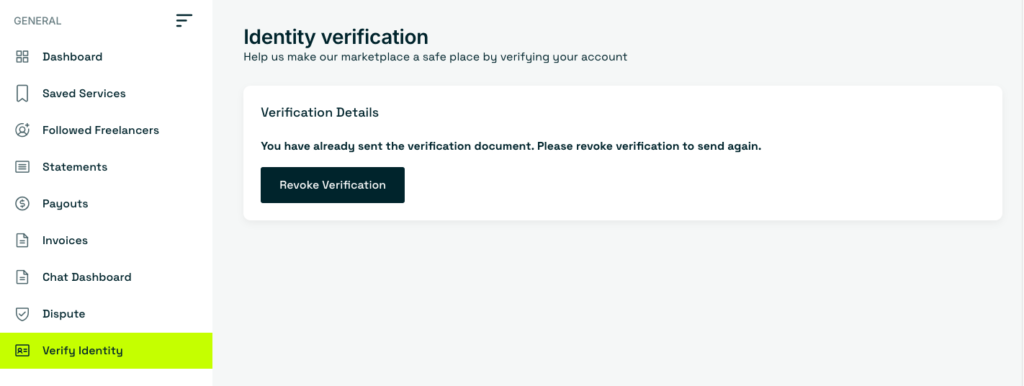
Go to the Identity Verification section. If you see the verification notice, click Revoke Verification.
"You have already sent the verification document. Please revoke verification to send again."Update & Resubmit
The verification form will reset immediately. Enter your correct information, upload the updated document, and submit your verification again.
Frequently Asked Questions (FAQ)
Yes, identity verification is mandatory for sellers and creators who wish to withdraw earnings, as Serpworks processes payouts strictly for verified accounts.
Serpworks accepts valid government-issued photo IDs including CNIC, Passports, National Identification Numbers (NIN), and Social Security Numbers (SSN).
If your submission is unclear or requires additional verification, our team will notify you directly with instructions on providing supplemental proof.