
Google Business Profile suspension & reinstatement
Google Business Profile Suspended? Here's What to Do Next.
If your business has disappeared from Google Maps or your profile says “Suspended” or “Disabled,” you're in the right place. Understand your next steps or find a local SEO specialist to help you review the issue and prepare an appeal.
Specialists can help you prepare. Google alone makes the reinstatement decision. No guaranteed approvals.

Illustrative process · Results depend on Google's review

Why does Google suspend a Business Profile?
A suspension can happen when Google believes a listing may not meet its rules. These are common things to check—not a diagnosis of your particular case. The appeals tool may show the relevant policy and restriction.

Extra words in the business name
Adding “best plumber,” a city name, or a slogan that isn’t part of your real business name may violate Google’s naming rules.

Address or service-area mismatch
Virtual offices, inaccurate addresses, or publicly displayed addresses for businesses that only travel to customers can raise eligibility issues.

Duplicate business listings
More than one profile for the same business location may cause confusion and policy issues. Don’t create a second listing to escape a suspension.

Business eligibility concerns
Google generally expects eligible in-person customer contact, either at your location or at customers’ locations. Online-only businesses may not qualify.

Details that don’t match reality
Your profile should reflect how the business actually operates. Check that its name, address, category, and documents are accurate.

Account or policy restrictions
Some issues involve the Google account managing the profile—not just the listing. An account restriction may need its own appeal first.

How to appeal a suspended Google Business Profile
Want to try reinstating your Google Business Profile yourself? Follow these five steps. You can use the official Google appeals tool for free, hiring a specialist is optional.
Open the restriction
Sign in with the Google account that manages the profile. Check the suspension decision and whether it can be appealed.
Check the policy
Read the policy Google identifies. Correct inaccurate business information and confirm the location is eligible.
Gather proof
Prepare any business registration, license, tax certificate, or utility bill that matches the profile’s details.
Submit your appeal
Use Google’s official Business Profile appeals tool. Include a clear explanation and evidence if Google offers that option.
Monitor your result
Check the appeals tool and email for updates. Don’t file duplicate appeals while waiting for a decision.
From appeal submitted to Google's decision.
Submitting an appeal is only part of the process. Here's what to expect next and why preparing accurate evidence matters.
- Appeal submitted. Google receives your request and any supporting material you provide.
- Google reviews your case. Track the status in the official appeals tool instead of submitting repeats.
- A decision is issued. Approval is possible, not guaranteed. A denial may qualify for an additional review.
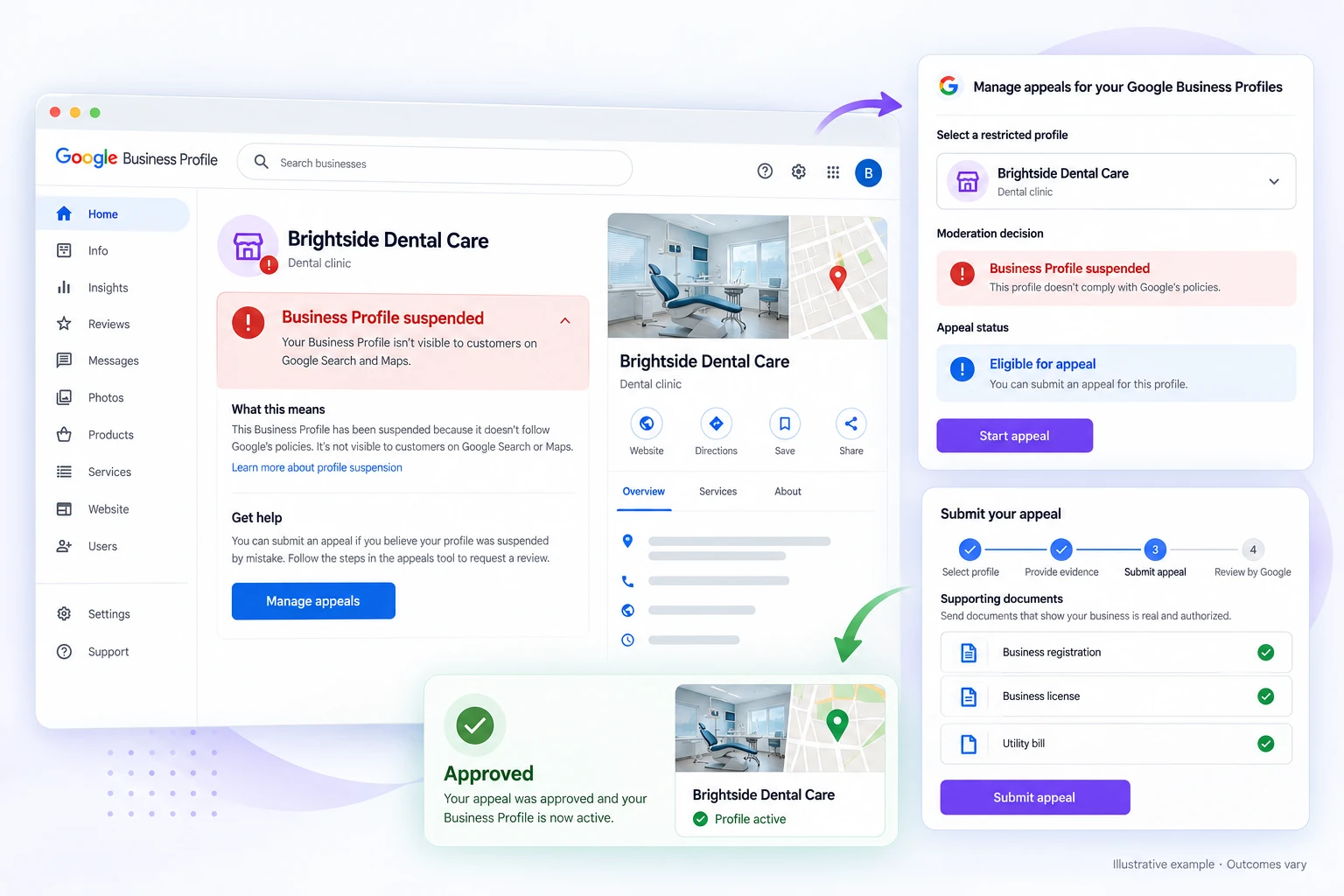

What evidence can help support your appeal?
Google may ask for documents showing that your business genuinely operates under the name and address on your profile. Gather these before opening an evidence form so you can submit them on time.
Google’s official reinstatement instructionsExamples of supporting evidence
You do not need every document on this list. Include relevant, accurate evidence if Google requests it. Details should match your profile, and approval is never guaranteed.

Need help? Find a GBP reinstatement specialist.
You can appeal on your own. But if the suspension reason is unclear, your documents don’t match, or an appeal was denied, an independent specialist can help you make a more informed next move.
Wondering who to trust with your business profile? Read how Serpworks vets local SEO specialists before comparing services.

Understand the suspension
A specialist can review the restriction message, appeal status, and likely areas to investigate before you act.
Check profile accuracy
Review your business name, location, service area, category and other details against Google’s rules.

Get your evidence organized
Identify relevant documents and prepare a clear, factual explanation for an eligible appeal.

Plan the next step
Already appealed or received a denial? Understand the status and whether an additional review may be available.