
How to Apply for Serpworks Specialists
Showcase your Local SEO experience on Serpworks . Complete six application steps after receiving an invitation. Every specialist application is reviewed before publication. Learn more about Serpworks and its marketplace.
Direct Answer Summary
Sign in to your Serpworks freelancer account, open the specialist application page and request an invitation if you do not already have access. Once invited, complete all six steps, review your profile preview and submit your application. An administrator must approve it before it appears in the Specialists directory .
Step-by-Step Guide: How to Complete Your Specialist Application
Start by opening the Specialist Application page while logged in to your freelancer account. Follow the instructions below to request access and complete your submission.
About field limits: The character counts and quantities in this guide are the default settings. Serpworks may update them. Always follow the live limits, character counters and available options shown in your application form.
Before You Start: Request an Invitation
- Log in with an existing freelancer account. New to Serpworks? Follow the freelancer signup guide and create your freelancer profile.
- Open Apply as a Specialist .
- If you are not invited, select Request Invitation in the popup.
- After submission, the confirmation says you will receive an update within 24 hours. The application stays locked while the request is pending.
- Once access is granted, return to the same application URL.
Already requested? Reopening the page shows your pending request status. If applications are closed or you need help, use Contact Support for Help.
How Your Published Specialist Profile Will Look
Before filling in your application, explore this example of a published specialist profile. See how your expertise, experience, countries served, case studies, featured services and marketplace reviews will appear to buyers after approval.
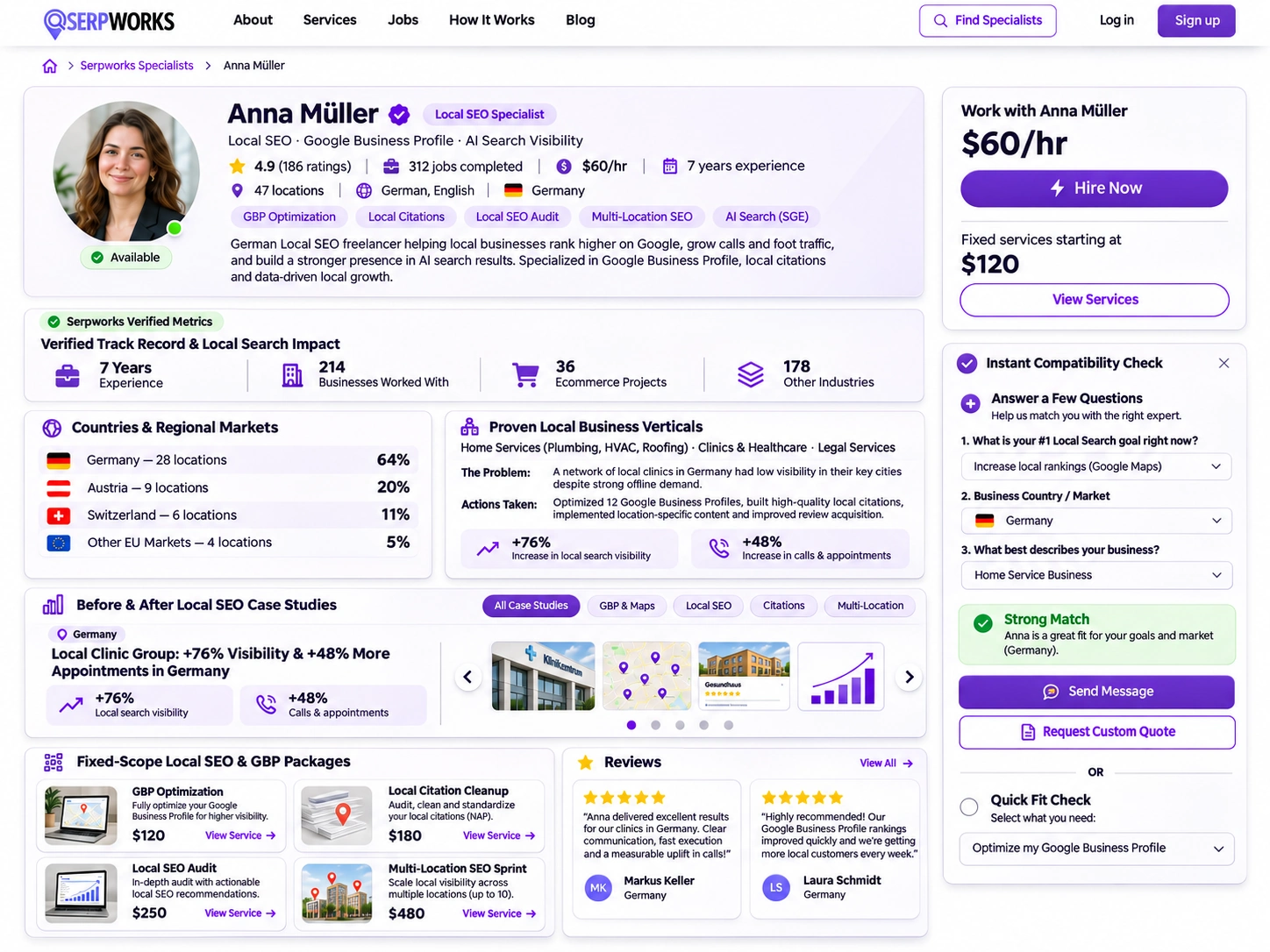 Click to enlarge
Step 1 of 6: Basic profile & expertise
Your existing freelancer name, profile picture, ratings, completed orders, language and country information are retrieved automatically where available. These are read-only in the application. Fill in the fields below to describe your specialist offering.
| Field | Limit / requirement | Example |
|---|---|---|
| Hourly rate (USD) | $1–$10,000; up to 2 decimal places | $60 |
| Professional category | Select an available professional category (default name limit: 45 characters) | Local SEO Specialist |
| Expertise headline | 75 characters | Google Business Profile & Map Pack SEO for local businesses |
| Specialized categories | Choose 1–5 from the list | Google Business Profile & Map Pack Optimization; Local Citations & Directory Audits |
| Short intro | 165 characters; keep to 3 short lines | I help local businesses improve Google Maps visibility, attract qualified leads and build consistent local citations. |
| Available for new work | On / off | On |
Choose only categories you can demonstrate through real work. Your advertised hourly rate is separate from your fixed-price services.
Click Continue to move to Step 2.
Step 2 of 6: Experience & business metrics
Enter your actual experience and project counts. These are applicant-provided metrics reviewed by Serpworks, not automatically calculated marketplace order totals.
| Field | Allowed range | Example |
|---|---|---|
| Years of local SEO experience | 0–50 years (whole number) | 7 |
| Total businesses worked with | 0–100,000 | 120 |
| Ecommerce businesses / projects | 0–100,000 | 24 |
| Other industry businesses / projects | 0–100,000 | 96 |
Use accurate, supportable figures. Do not inflate counts or treat a single business as multiple clients just because it has several locations. Enter 0 where you have no experience. The location total comes from Step 3.
Click Continue .
Step 3 of 6: Countries & markets
Add the countries where you have actually worked with businesses. Use Add country for additional markets.
| Field | Limit / requirement |
|---|---|
| Country | 1–8 distinct countries; choose from the dropdown |
| Number of locations | 1–100,000 per country |
| Cities / states served | 100 characters per country |
| Country | Locations | Cities / states served | Share |
|---|---|---|---|
| Germany | 21 | Berlin, Hamburg, Munich | 58% |
| Austria | 9 | Vienna, Salzburg | 25% |
| Switzerland | 6 | Zurich, Basel | 17% |
The example has 36 total locations. Market percentages are calculated automatically from your location counts and rounded for display. Your own profile country is separate from these markets.
Click Continue .
Step 4 of 6: Industry expertise
Choose your industry from the predefined Industry / Vertical dropdown and select the relevant business specializations. Add up to five industry verticals by default, and describe the business problem, the work you performed and two measurable results for each.
| Field | Limit / requirement |
|---|---|
| Industry / vertical | Choose an available industry from the dropdown |
| Business specializations | Choose up to five relevant specializations by default |
| Custom industry name | Only when Other Industries is selected; default 45 characters |
| Clients served | 0–100,000 |
| The problem | 180 characters |
| Actions taken | 200 characters |
| Metric 1 / 2 label | 40 characters each |
| Result / before → after | 20 characters each |
Home Services (HVAC, Plumbing, Roofing) · 31 clients
The problem: Out-of-area calls and low-intent job types were wasting the advertising budget.
Actions taken: Refined service areas, removed irrelevant job types and disputed invalid leads to improve lead quality.
For the example above, select Home Services and tick HVAC, Plumbing and Roofing. Enter 31 in Clients served. If your industry is not listed, select Other Industries and enter its name. Each entered industry must include a problem, actions and both result metrics. Use data you can support and avoid confidential client details.
Use Add industry for more verticals, then click Continue .
Step 5 of 6: Case studies
Add at least one case study (up to 15 by default). Choose the most relevant Main skill from the current dropdown, enter the target location and write a specific portfolio title. Each case study contains two result boxes. Selecting a skill suggests two relevant metric labels; you can edit these labels to reflect the actual results of your project.
| Field | Limit / requirement |
|---|---|
| Main skill | Choose one skill from the currently enabled skill list |
| Target location | 45 characters |
| Portfolio title | 95 characters |
| Problem | 180 characters (optional) |
| Actions taken | 200 characters (optional) |
| Metric 1 / 2 label | 40 characters each by default; suggested labels are editable |
| Result / before → after | 20 characters each by default; enter actual results |
| Completed Serpworks order ID | Optional; must be your own completed service order |
| Evidence note / reference (private) | 250 characters; optional |
Improved Map Pack visibility for a Berlin dental clinic in 60 days
Problem: The clinic was not appearing consistently in the top three Map Pack results.
Actions taken: Improved GBP categories, location-page content and citation consistency, then monitored rankings using a local grid.
Private evidence example: Redacted before/after grid report and GBP performance export, measured over the same 60-day period.
GBP ranking grid images
Select Google Business Profile & Map Pack Optimization in Main skill to reveal the optional ranking grid upload fields. They are hidden for other skills. Add up to five images per GBP case study by default. Each image must be exactly 500 × 500 pixels , no larger than 2 MB , and in PNG, JPEG or WebP format. Images are public portfolio assets, so remove personal or confidential information before uploading.
A linked order establishes a connection to an actual completed Serpworks service order; it does not automatically verify the claimed SEO results. Evidence notes are private to the application review. Do not invent order IDs or results.
Example metrics for the 15 default case study skills
The examples below use the default skill catalogue. Available skills and suggested metric labels may change as Serpworks updates the catalogue. All results are fictional and demonstrate the format only. Replace them with your actual, supportable results.
| Main skill | Metric 1 · example result | Metric 2 · example result |
|---|---|---|
| Backlink Audits & Disavow Services | Toxic link ratio · 34% → 2% | Organic traffic recovery · +118% |
| Content Strategy & Blogging | Non-branded organic traffic · +145% | Top-3 ranking keywords · 12 → 64 |
| Digital PR & Media Outreach | Editorial media placements · 14 | Average referring domain DR · 68 |
| Enterprise & Multi-Location SEO | Multi-branch directory sync · 48% → 99% | Aggregate local impressions · +84% |
| Foundational & Web 2.0 Link Assets | Branded entity profiles built · 45 | Referring domains growth · +110% |
| Google Business Profile & Map Pack Optimization | Map Pack grid average · #11.4 → #2.1 | GBP direction & call actions · +76% |
| Guest Posting & Contextual Link Building | Domain rating growth · 19 → 38 | Target page organic traffic · +132% |
| Hyper-Local Link Building | Geo-relevant referring domains · +28 | Local service page rankings · #9.2 → #2.4 |
| Lead Generation & Automation | Lead-to-booked appointment rate · 14% → 39% | Average lead response time · 4h → 1min |
| Local Citations & Directory Audits | NAP consistency score · 52% → 98% | Local Map Pack visibility · +47% |
| Local E-Commerce & Inventory SEO | Local inventory ad ROAS · 2.4x → 5.1x | In-store product visits · +63% |
| Local Paid Media & LSA | Cost per qualified lead · $94 → $55 | Booked call volume · +68% |
| On-Page & Technical Local SEO | Core Web Vitals pass rate · 41% → 96% | City landing page conversions · +58% |
| Reputation & Review Management | Google star rating · 3.8 → 4.8 | Monthly review velocity · +240% |
| Wikipedia & Knowledge Graph | Google Knowledge Panel · Verified & claimed | Branded entity search CTR · +37% |
Click Add case study if needed, then Continue .
Step 6 of 6: Featured services & review
- Select up to four of your existing published Serpworks services. Service names, thumbnails and prices are retrieved from the original listings.
- Choose services relevant to your expertise and case studies.
- Review the live profile preview and check each previous step using the Back button.
- Click Save draft if you need to finish later, or Submit application to send it for review.
Four relevant featured services
You do not have to create four new services just for this form. Choose up to four available published services; the prices shown here are examples, not required rates.
After Submission: Review & Publication
- Serpworks reviews your application, experience metrics and case-study evidence.
- Check your application status and any review notes. If changes are requested, update the relevant fields and resubmit.
- Once approved, your specialist profile becomes eligible to appear in the public directory. Your normal freelancer profile remains separate.
- Your specialist page uses the format serpworks.com/specialists/your-freelancer-slug/ .
The invitation review message refers to invitation requests, not a guaranteed 24-hour specialist application approval. Changes to an approved profile require review before a new version is published.
Frequently Asked Questions
Do I need an invitation to apply?
Yes. An invitation must be granted to your account before you can open and submit the application.
Can I save my application and finish later?
Yes. Use Save draft to store your work, then revisit the application page.
Can I use case studies from outside Serpworks?
Yes. The completed Serpworks order ID is optional. Include a clear private evidence reference and only submit results you can support.
Do I need to upload five ranking grids?
No. The optional GBP ranking grid section accepts up to five images per GBP case study.
Will my regular profile ratings and reviews be copied?
Existing ratings, reviews and completed order information are retrieved from your normal profile. You do not manually enter them in this application.
Does an invitation mean my specialist profile is approved?
No. The invitation unlocks the application. The completed application must be reviewed separately.
Ready to showcase your Local SEO expertise?
Explore the directory to see how approved specialists showcase their experience and services.